
What is Full Site Editing (FSE) in WordPress and how is it related to Kadence?
Elias Ramirez Sanchez
Actualizado June 30, 2025
Full Site Editing (FSE) has completely revolutionized the way we design and manage WordPress websites. If you’re looking to master this transformative technology and get the most out of Kadence in this new ecosystem, you’ve come to the right place.
What is Full Site Editing and Why Should You Care?
Full Site Editing isn’t just another WordPress update it’s the most significant revolution since the introduction of the Gutenberg editor. This functionality, which reached maturity with WordPress 5.9 in January 2022, allows you to visually edit every aspect of your website using a block based approach.
Many designers are still clinging to outdated methods while their competitors are already leveraging the advantages of FSE to build faster, more flexible, and easier to maintain sites.
Core Components of FSE
FSE is built on four essential pillars that revolutionize the design experience:
Site Editor: A unified interface under Appearance → Editor that lets you visually edit templates and template parts.
Templates and Template Parts: Design structures for specific content types and reusable sections like headers and footers.
Global Styles: Centralized controls for typography, colors, and layout that apply across the entire site.
Block Themes: Themes built entirely with blocks, which are necessary to fully utilize FSE features.
FSE vs. The Classic Editor: A Night and Day Difference
The contrast between the Classic Editor and FSE represents a paradigm shift in web development:
Classic Editor: Limited to an interface similar to Microsoft Word with basic formatting functions and total reliance on the theme for design modifications.
FSE: A modern, block based interface with intuitive controls that allows for complete visual editing of the entire website, granting total creative freedom without theme restrictions.
But here’s where it gets interesting: FSE not only improves the editing experience but also democratizes web design by allowing users without advanced technical skills to create professional sites.
The Unstoppable Evolution of FSE in WordPress
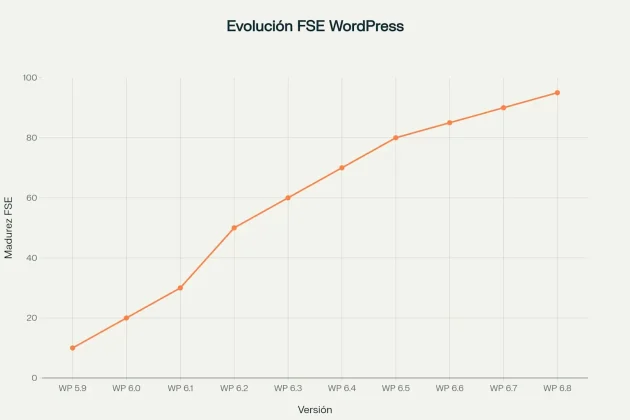
The development of FSE has been a gradual but steady process that began with the Gutenberg project and has evolved significantly to become the WordPress standard.
WordPress 5.9: The Historic Turning Point
WordPress 5.9 “Josephine,” released in January 2022, marked the MVP (Minimum Viable Product) of Gutenberg’s customization phase. This version introduced revolutionary elements that changed the WordPress landscape forever:
- Block Themes: Themes based entirely on blocks
- Site Editor: A unified interface for complete site editing
- Global Styles: A visual configuration system
- Editable Templates: Customization of page layouts
- theme.json file: Programmatic configuration of styles
WordPress 6.8: The Definitive Consolidation
WordPress 6.8, released in April 2025, consolidated FSE functionalities with significant improvements in usability and performance. The most notable enhancements include:
Improved Editor:
- Integrated template selector with direct access from the preview menu
- Optimized data views for more organized page and template management
- Simplified navigation with a more intuitive workflow
Revamped Style Book:
- More structured layout with clear labels
- Direct access from the editor’s sidebar menu
- Consolidated editing for colors, typography, and block styles
Performance Enhancements:
- Speculative Loading: Faster navigation that preloads pages in the background
- bcrypt for passwords: Enhanced security
- Code optimizations for better overall performance
Current Trends in Modular Design
Modular design has established itself as a dominant trend, and FSE is perfectly aligned with this philosophy. The features of modular design in FSE include:
Reusable Components:
- Reusable pre designed block patterns
- Flexible and adaptable modular templates
- Custom blocks for various specific needs
- Design systems that ensure visual consistency
Dynamic and modular content allows administrators to create content that updates automatically based on user behavior, maximizing engagement and relevance.
Kadence and its Strategic Position in the FSE Ecosystem
What Makes the Kadence Theme Special?
Kadence Theme is a lightweight yet feature rich WordPress theme designed for building fast, accessible, and visually stunning websites. With over 400,000 active installations and a 5 star rating, it has established itself as one of the most popular alternatives on the market.
Distinctive Features of Kadence:
Optimized Performance:
- Lightweight and efficient code for fast page loads
- Native SEO optimization that improves rankings
- Responsive design optimized for all devices
- Compatibility with shared hosting and limited resources
Integrated Visual Builder:
- Header and Footer Builder with a drag and drop system
- Advanced customization without programming knowledge
- Multiple placement areas for elements
- Unlimited design options
The Current State of Kadence with FSE
The reality is: Currently, Kadence Theme is not a native FSE theme but a classic/hybrid theme that offers advanced customization features through its own system. However, Kadence WP has confirmed the development of an FSE version of the theme.
As the Kadence team officially stated: “Will Kadence Theme support WordPress core’s block-based, full-site editing? Yes! We are working on a version of the Kadence Theme which will support FSE”.
Kadence Blocks: The Bridge to FSE
Kadence Blocks is the companion plugin that extends Gutenberg’s capabilities with advanced blocks designed for creating professional websites. This plugin is crucial because it works in both classic and FSE themes.
Essential Blocks Included:
Content Blocks:
- Accordion: Expandable sections with nested content
- Advanced Button: Customizable buttons with hover effects
- Advanced Text: Complete typography control
- Icons: Over 1,500 SVG icons included.
Layout Blocks:
- Row/Layout: Flexible column system
- Spacer/Divider: Spacing and separator control
- Testimonials: Stylized review sections
- Advanced Gallery: Responsive carousels and sliders
The result was stunning: Kadence Blocks only loads CSS or JavaScript when needed and only for the blocks being used on a specific page, significantly optimizing performance.
How to Implement Kadence with FSE: A Practical Strategy
Step 1: Initial Ecosystem Setup
To leverage Kadence in an FSE environment, you need to correctly set up both the theme and its companion plugins:
Installing the Kadence Ecosystem:
- WordPress Admin → Themes → Add New → Search for “Kadence”
- WordPress Admin → Plugins → Add New → “Kadence Blocks”
- WordPress Admin → Plugins → Add New → “Kadence Starter Templates”
Activating a Compatible FSE Theme:
- Twenty Twenty-Four: Recommended native FSE theme
- Other FSE themes: That support Kadence Blocks
- FSE Check: Verify that “Editor” appears under Appearance
Step 2: Optimizing Kadence Blocks for FSE
Critical Settings:
| Setting | Recommendation | Purpose |
|---|---|---|
| Required Blocks | Activate only those needed | Performance optimization |
| CSS Loading | Optimized mode | Reduce page weight |
| Global Settings | Establish defaults | Design consistency |
| Responsive settings | Configure breakpoints | Adaptive design |
Disabling unnecessary blocks can reduce resource load by up to 40%, significantly improving loading speed.
Step 3: Creating Advanced Global Templates
Creating global templates by leveraging Kadence Blocks in an FSE environment allows you to design reusable and consistent layouts:
Recommended Template Structure:
text- Header with Kadence Blocks: Logo, navigation, and custom elements
├── Advanced Header Block
├── Advanced Navigation Block
└── Logo and custom elements

- Content Area: Kadence Blocks for specific sections
├── Row/Layout Blocks
├── Advanced Text Blocks
└── Custom Button Blocks

- Custom Footer: Contact info, social links
├── Advanced Footer Elements
├── Social Media Integration
└── Copyright and secondary navigation
Step 4: Professional Headers and Footers
Kadence offers two powerful methods for customizing headers and footers in FSE environments:
Method 1: Kadence Native Builder (Classic Theme)
- 3 header rows: Top, main, and bottom
- 3 sections per row: Left, center, right
- Available elements: Logo, navigation, buttons, search, cart, social.
Method 2: Advanced Header/Footer Blocks for FSE
- Advanced Header Block with responsive navigation
- Customizable elements: Logo, search, buttons
- Sticky behavior with fixed or transparent headers
- Mobile optimization with automatic hamburger menus.
Kadence’s Advanced Header/Navigation Blocks are the only blocks that allow you to build fully customizable headers directly in the native WordPress editor.
Competitive Advantages of Combining Kadence with FSE
Unprecedented Design Flexibility
Combining Kadence with FSE offers a hybrid customization system that provides multiple levels of control:
| Level | Tool | Capabilities | Ideal User |
|---|---|---|---|
| Global | Kadence Customizer | Colors, fonts, layouts | Beginners |
| Template | FSE Editor + Kadence Blocks | Page structures | Intermediate |
| Block | Individual Blocks | Specific elements | Advanced |
| CSS | Custom CSS | Total control | Developers |
Superior Performance Optimization
One of the most significant advantages of combining Kadence with FSE is the superior performance optimization compared to other solutions:
Documented Metrics:
- Lightweight code: Specifically optimized for WordPress
- Intelligent loading: Only necessary resources are loaded
- SEO-friendly: Code optimized for search engines
- Optimized Web Vitals: Superior scores on Google metrics
Ease of Use for Non-Technical Users
The democratization of web design is one of FSE’s main goals, and Kadence significantly facilitates this process:
Accelerated Learning Curve:
Beginner Level (1-2 weeks):
- Using Starter Templates with AI
- Basic color and typography setup
- Simple header and footer customization
Intermediate Level (2-4 weeks):
- Creating custom patterns
- Using basic Kadence Blocks
- Manual responsive configuration
Advanced Level (1-2 months):
- Full FSE integration
- Custom blocks and CSS
- Performance optimizations
Strategic Comparison: Kadence vs. Competitors
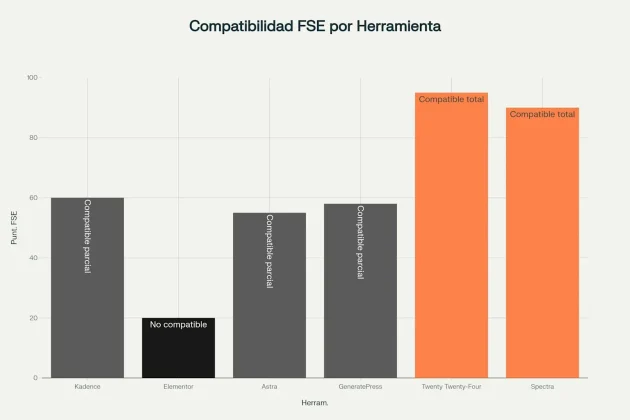
Kadence vs. GenerateBlocks for FSE
The comparison between Kadence and GenerateBlocks represents two different philosophies: comprehensive functionality versus optimized minimalism.
Advantages of Kadence Blocks:
- ✅ Extensive functionality: Sliders, accordions, advanced forms
- ✅ Included patterns: Complete, ready-to-use sections
- ✅ Native integration: Optimized for Kadence Theme
- ✅ Integrated AI: Automated content generation
- ✅ Starter Templates: Full sites with one click
Advantages of GenerateBlocks:
- ✅ Superior performance: Extremely optimized code
- ✅ Total flexibility: Complete control over design
- ✅ Stability: Solid and reliable foundation
- ✅ Excellent support: High-quality customer service
Kadence vs. Native FSE Themes
Advantages of Kadence over Native FSE Themes:
Maturity and Stability:
- A proven ecosystem with years of development and refinement
- Extensive compatibility with virtually all plugins
- Comprehensive documentation with extensive educational resources
- An established community with a large and active user base
Advantages of Native FSE Themes:
- Future-Proofing: Alignment with WordPress core and synchronized development
- Native Functionality: Takes full advantage of FSE
- Automatic Updates: Improvements included with WordPress core updates
- Modern Standards: Compliance with current specifications
The Current FSE Market Landscape
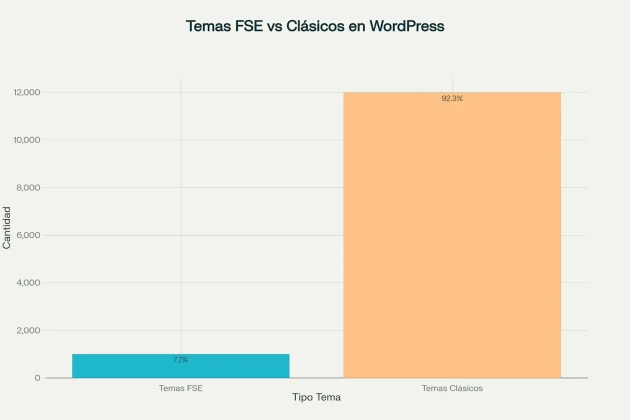
The FSE theme market has seen significant growth but still represents a fraction of the total market. According to data from WordPress.org, there are currently 1,000 FSE themes available out of a total of 12,984 themes, representing only 7.7% of the market.
Factors Explaining the Gradual Adoption:
Resistance to Change:
- The Classic Editor plugin is active on over 5 million websites
- Many developers and users show hesitation towards new changes
- The transition can disrupt established workflows.
Commercial Challenges:
- The commercial market for FSE themes remains limited
- ThemeForest has over 11,000 WordPress themes available
- Only 200+ options are tagged as Block Editor compatible.
Emerging Opportunities:
- Growth of 457 FSE themes in 2024 alone
- Established companies like Brainstorm Force (Spectra One) and Yith (Yith Wonder) are launching FSE solutions
- WordPress is actively pushing adoption with continuous improvements.
Practical Migration Strategies
When to Choose Kadence for FSE
Ideal Scenarios:
Business Projects:
- Complex corporate sites with multiple sections and functionalities
- Advanced e-commerce with optimized WooCommerce integration
- Multilingual sites with compatibility for translation plugins
- Large teams needing granular roles and permissions
Agencies and Developers:
- Rapid development using Starter Templates to accelerate projects
- Non-technical clients who require a familiar and easy-to-use interface
- Scalable maintenance for efficient management of multiple sites
- Pricing flexibility with options for different budgets
- Complete inventory: pages, posts, media, forms
- Plugin analysis: compatibility with FSE and Kadence Blocks
- Current theme evaluation: features to preserve or improve
- Identification of customizations: custom CSS, specific functions
Gradual Migration Process
Phase 1: Evaluation and Preparation
Existing Site Audit:
Phase 2: Kadence Configuration
Global Setup:
css:root {
--primary-color: #FC8249;
--secondary-color: #5B5B5B;
--text-color: #191919;
--accent-color: #ff6900;
}
Phase 3: FSE Implementation
Template Hierarchy:
texttemplates/
├── index.html (Homepage)
├── single.html (Single Posts)
├── page.html (Static Pages)
├── archive.html (Archives)
└── 404.html (404 Error)
Complementary Tools and Automation
Essential Plugins for FSE
Block Editor Enhancement:
- Greenshift: Over 20 special blocks with advanced animations
- Custom Fonts: Advanced management of local and Google Fonts
- Block Editor Settings: Activates all available editor settings
Workflow Automation
Content Automation:
javascript// Example of an automated workflow
triggers:
- new_post_published
- category_specific

actions:
- update_homepage_query_loop
- generate_social_media_post
- send_newsletter_notification
- update_related_posts_sidebar
Advanced Development Tools:
WP-CLI Commands for Kadence:
bash# Useful commands for automation
wp kadence import-template --template-id=business-consulting
wp kadence optimize-css --minify --combine
wp kadence generate-patterns --from-existing-content
wp kadence backup-settings --include-customizer
The Future of FSE and Kadence: 2025 Projections
Emerging Trends
Integrated Artificial Intelligence:
- Kadence AI for automated content generation
- Design assistance with intelligent suggestions
- Automatic performance optimization based on usage data
Sustainable Design:
- Optimization for lower energy consumption
- More efficient code and optimized resources
- Integrated sustainability metrics
Dynamic Personalization:
- Experiences adapted to user behavior
- Content that updates automatically
- Advanced audience segmentation
Kadence’s Evolution Towards FSE
Based on official statements from the Kadence team and market trends, we can expect:
Confirmed Developments:
- A native FSE version of the Kadence Theme
- Expansion of Advanced Header/Navigation Blocks
- Improvements in integration with the WordPress Site Editor
- Specific optimizations for WordPress 6.8 and future versions
Market Opportunities:
- 457% growth in FSE themes during 2024
- Accelerated enterprise adoption of FSE technologies
- Gradual migration from traditional page builders
- Consolidation of Kadence as a leader in the hybrid FSE space
Implement This Now
Immediate Step:
Start by installing Kadence Theme + Kadence Blocks in a staging environment and experiment with Twenty Twenty-Four as your base FSE theme.
Week 1:
Set up your first header using Advanced Header Blocks and create 3 basic reusable patterns.
Weeks 2-3:
Migrate a key page from your current site to FSE using Kadence Blocks and measure the performance improvements.
Month 1:
Develop your complete design system with standardized colors, fonts, and components.
The key to success is: Start with small projects, measure results, and scale gradually as the FSE ecosystem continues to evolve.
FSE with Kadence isn’t just an emerging technology it’s the future of web design in WordPress. Professionals who master this combination now will have a significant competitive advantage in the 2025 market and beyond.

Elias Ramirez
Behind KadeRank is me, its founder, with 11 years dedicated to the world of Web positioning (SEO), site optimization and WordPres. I help businesses and entrepreneurs to build and improve their internet presence with fast, effective and well-positioned websites, specializing in the environment of Kadence WP.