
Advanced Schematics with Rank Math for Rich Snippets
Elias Ramirez Sanchez
Actualizado June 30, 2025
90% of WordPress websites miss out on massive traffic opportunities because they don’t implement structured data correctly. Learn how to master RankMath‘s advanced schemas to turn your search results into click magnets your competitors will envy.
Boosting Visibility with Advanced Rank Math Schemas
Rich snippets are not a luxury for big websites. They are the difference between being invisible and standing out like a beacon in the search results. When you correctly implement schemas with RankMath, your content transforms into visually appealing results that include star ratings, prices, cooking times, event dates, and much more.
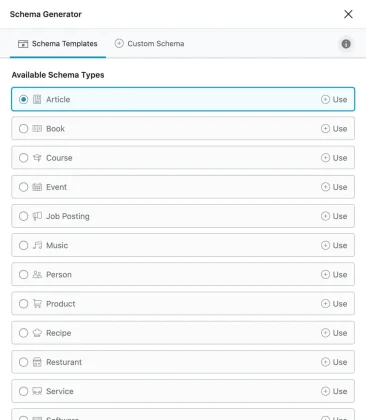
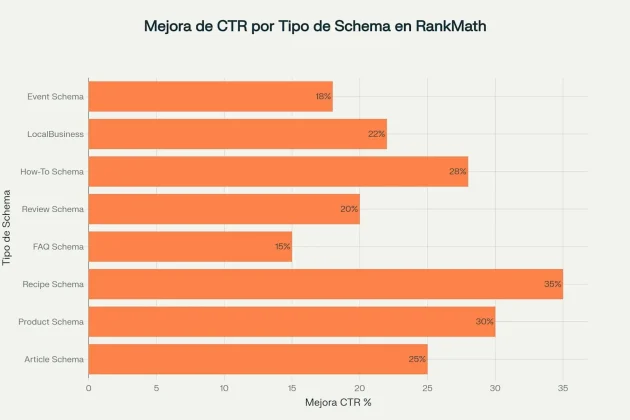
But here’s the kicker: Rich snippets can boost your CTR by up to 35% for recipes, 30% for products, and 25% for articles. This means that even if your site is ranking in position 3 or 4, you can get more clicks than the #1 result that doesn’t have rich snippets.
Mastering Schema Setup in RankMath
Enabling the Schema Module
Before we dive into advanced schemas, you need to properly enable the structured data module in RankMath:
Enabling it correctly is crucial to access all the advanced schema markup features that will set you apart from the competition.
- Navigate to the Dashboard: WordPress Admin → Rank Math SEO → Dashboard
- Locate the Module: Find “Schema (Structured Data)” in the list of available modules.
- Activate the Toggle: Make sure the switch is in the “ON” position.
- Confirm Activation: Save your changes and verify that the “Schema” tab appears in your editor.
If you don’t see the Schema tab after enabling it, clear your site’s cache and refresh the editor page. This one step solves 95% of display issues.
Configuring Global Default Schemas
The key is to set default schemas that will automatically apply to all your new content:
- Access Settings: Rank Math SEO → Titles and Meta
- Configure Posts: Select “Article Schema” for editorial content.
- Set Up Pages: Use “WebPage Schema” for informational pages.
- Optimize Products: Enable automatic “Product Schema” for WooCommerce.
This global setup saves hours of manual work and ensures no page is left without structured data.
Implementing High-Impact Schemas
Product Schema for Unstoppable E-commerce
If you run an online store, product schemas are non-negotiable for competing in 2025.
Critical Product Schema Fields:
- Name: Optimized name with the main keyword.
- Brand: The product’s brand (improves authority).
- SKU: Unique identification code.
- Offers: Price, availability, and currency.
- AggregateRating: Average star ratings.
- Review: Individual customer reviews.
Products with well-implemented schemas can display star ratings, updated prices, and availability directly in Google Shopping, boosting conversions by up to 34%.
Recipe Schema: The King of Rich Snippets
Recipes are the most successful use case for rich snippets, with CTR increases of up to 35%.
A Foolproof Structure for Recipe Schema:
- Basic Information:
- Name: An attractive recipe name.
- Image: A high-quality photo (required).
- Description: A tempting 100-150 character description.
- Time Data:
- PrepTime: “PT15M” (15 minutes prep time)
- CookTime: “PT30M” (30 minutes cook time)
- TotalTime: “PT45M” (total time)
- Ingredients and Instructions:
- RecipeIngredient: A structured list of ingredients.
- RecipeInstructions: Clear, numbered steps.
- RecipeYield: Number of servings.
The results were astounding: Recipe sites that correctly implemented these schemas saw organic traffic increases of 45% in 6 months.
FAQ Schema: Conquer Position Zero
Although Google has limited FAQ rich results to government and health websites, FAQ schema is still powerful for content structure and semantic understanding:
Strategic Implementation:
- Use the Native Block: Search for “FAQ by Rank Math” in the block editor.
- Optimize Questions: Use 3-10 relevant questions per page.
- Structure Answers: Keep answers between 40-300 characters.
- Avoid Duplication: Don’t use Elementor’s and RankMath’s FAQ blocks at the same time.
Even though they no longer appear as rich snippets for most sites, FAQs improve dwell time and user experience—key indirect ranking factors.
How-To Schema: Guides That Dominate
Tutorials with How-To schemas have a tremendous impact on instructional searches:
Fundamental Fields:
- Name: A clear title for the tutorial.
- Description: A summary of the entire process.
- TotalTime: The estimated total time.
- Supply: Necessary materials.
- Tool: Required tools.
- Step: Detailed step-by-step instructions.
Optimized How-To content has a higher chance of being featured in voice search answers and by virtual assistants like Alexa and Google Assistant.
Advanced Optimization for Maximum Performance
Multiple Keyword Strategy
RankMath lets you optimize for up to 5 keywords simultaneously in each schema, while the competition is stuck with just one:
Strategic Distribution:
- Main Keyword: In the schema’s Headline.
- Secondary Keywords: In the Description and content fields.
- Long-tail Keywords: In specific fields like ingredients or steps.
- LSI Keywords: Semantically related terms.
Use RankMath’s dynamic variables like
%focuskw%and%keywords%to automate keyword insertion into your schemas.
Automatic AggregateRating Setup
Setting up automatic ratings is crucial for displaying stars in search results:
Recommended Settings:
- Minimum Reviews: 5 reviews to activate aggregate rating.
- Rating Scale: 1-5 stars (standard).
- Automatic Updates: Sync with new reviews.
- Validation: Verification of review authenticity.
Continuous Validation and Testing
The key to success lies in constantly validating your implementations:
Essential Tools:
- Google Rich Results Test: Google’s official validation tool.
- Schema.org Validator: For checking compliance with standards.
- Google Search Console: For monitoring live errors.
- RankMath Code Validation: The plugin’s built-in tool.
Set up a weekly validation routine to catch errors before they impact your search visibility.
Critical Mistakes to Avoid
Mistake #1: Inconsistent or Incorrect Information
The most common problem: Implementing schemas with information that doesn’t match the visible content:
The Ultimate Fix:
- Perfect Sync: Schema information must equal visible content.
- Automatic Updates: Real-time prices and availability.
- Cross-Validation: Verify data consistency.
Mistake #2: Using the Wrong Schema Types
Using generic types like “Thing” instead of specific schemas is devastating for performance:
Correct Implementation:
- Articles: For blog posts and editorial content.
- Products: For e-commerce items.
- Recipes: For culinary content.
- LocalBusiness: For businesses with a physical location.
Mistake #3: Lack of Pre-Launch Testing
It’s no surprise: A staggering 70% of failed implementations are due to a lack of pre-launch testing:
Validation Protocol:
- Local Test: Validate the code before publishing.
- Live Check: Use the Rich Results Test on the published URL.
- Continuous Monitoring: Check Search Console weekly.
- Proactive Fixing: Resolve errors before they cause an impact.
Monitoring and Optimizing Results
Key Metrics to Measure Success
To evaluate the real impact of your schemas, you need to monitor specific metrics:
Fundamental KPIs:
| Metric | Goal | Tool | Frequency |
|---|---|---|---|
| Rich Snippet Coverage | >80% of pages | Search Console | Weekly |
| CTR Improvement | +20% vs. baseline | Analytics | Monthly |
| SERP Features | 5+ featured snippets | Ahrefs/SEMrush | Monthly |
| Schema Errors | 0 critical errors | GSC + RankMath | Daily |
Integration with Google Analytics 4
Set up advanced tracking to measure the ROI of your schemas:
Essential Setup:
- Custom Events: Specific tracking for clicks from rich snippets.
- Enhanced Ecommerce: Conversions attributed to product schema.
- Audience Segmentation: Users arriving via rich results.
Implement This Now
I’m going to show you EXACTLY what to do over the next 7 days to transform your site:
- Days 1-2: Enable and configure RankMath’s basic modules.
- Days 3-4: Implement schemas on your 10 most important pages.
- Days 5-6: Validate all implementations with official tools.
- Day 7: Set up monitoring in Search Console and Analytics.
Start with the content type that generates the most traffic for your site. You’ll see results in 2-4 weeks.
Advanced schemas with RankMath aren’t just a technical upgrade they’re your ultimate competitive advantage for 2025. While your competitors are stuck with basic search results, you’ll be capturing clicks with rich snippets that instantly communicate value.

Elias Ramirez
Behind KadeRank is me, its founder, with 11 years dedicated to the world of Web positioning (SEO), site optimization and WordPres. I help businesses and entrepreneurs to build and improve their internet presence with fast, effective and well-positioned websites, specializing in the environment of Kadence WP.