
SolidWP vs Wordfence: Choose the Best WordPress Security Plugin in 2025
Elias Ramirez Sanchez
Actualizado June 29, 2025
Today, I’m going to show you which of these two WordPress security giants (SolidWP vs. Wordfence) is worth your investment and why most experts are changing their long-standing recommendations.
SolidWP vs. Wordfence: The Brutal Reality of WordPress Security in 2025
WordPress faces 90,000 attacks per day, with over 13,000 sites compromised daily. A staggering 93.25% of vulnerabilities come from plugins, making the choice of the right security system a critical decision for your digital survival.
The data is devastating: in the first quarter of 2025 alone, Patchstack blocked over 6,500 attacks targeting a single critical vulnerability. This reality makes choosing between SolidWP vs Wordfence not just a matter of preference, but a decision that could determine the future of your online business.
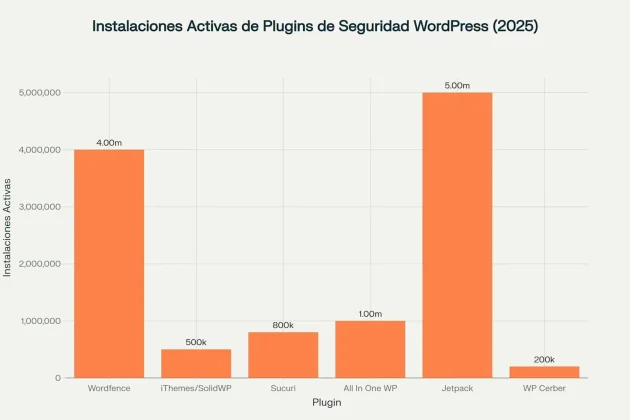
The key isn’t choosing the most popular plugin, but the one that best fits your specific security strategy. While Wordfence dominates in active installations, SolidWP leads in technological innovation.
Decoding the Fundamental Differences in Their Approaches
The Virtual Patching Revolution vs. Traditional Scanning
SolidWP has completely transformed the WordPress security paradigm through its integration with Patchstack. This technology applies virtual patches that block specific exploits before they can reach vulnerable code, without modifying any site files.
Virtual patching works by deploying specific rules that mitigate vulnerabilities without changing the vulnerable code itself. It’s like having an invisible shield that recognizes and stops precise attacks based on known patterns.
Wordfence, on the other hand, maintains the traditional approach of reactive detection. Its system scans files for malware that is already present, compares them against official repositories, and detects malicious code injections after they have potentially occurred.
- Virtual Patching (SolidWP): Proactive prevention with specific rules
- Traditional Scanning (Wordfence): Comprehensive post-infection detection
- Performance Impact: Virtual patching consumes fewer resources
- Effectiveness: Prevention vs. Remediation
Network Architecture: 1 Million vs. 4 Million Sites
SolidWP’s Global Protection Network connects nearly 1 million websites, creating collaborative intelligence that identifies emerging threats. Every blocked attack is shared instantly across the entire network.
Wordfence operates with over 4 million installations, providing a massive database of attack patterns. Its real-time blacklist blocks more than 40,000 known threat actors.
The crucial difference isn’t the size of the network, but how that intelligence is used. SolidWP applies automatic, preventive protection, while Wordfence requires manual configuration to fully leverage its network.
Analyzing the Real Impact on Your Site’s Performance
Concrete Data on Resource Consumption
Performance metrics reveal significant differences that directly impact user experience:
| Plugin | Frontend Time | Backend Time | CSS (KB) | JavaScript (KB) | Memory Usage |
|---|---|---|---|---|---|
| SolidWP | 59ms | 57ms | 4.6 | 413 | +84% on average |
| Wordfence | 55ms | 60ms | 19 | 25.9 | High during scans |
The numbers reveal a paradox: SolidWP uses more memory overall but is faster than 99% of plugins, while Wordfence can slow down sites during intensive scans.
Optimization for High-Traffic Sites
SolidWP uses cloud processing for heavy operations like backups, reducing the load on the origin server. Its modular architecture activates only necessary features, automatically optimizing resources.
Wordfence compensates with an optimized .htaccess configuration that improves firewall performance, but it requires manual adjustments for sites with thousands of daily visitors.
For sites with over 10,000 monthly visitors, consider scheduling Wordfence scans during off-peak hours. SolidWP handles constant traffic better without additional configuration.
Breaking Down the Price Differences That Will Change Your Mind
SolidWP’s Devastating Price Advantage
The numbers speak for themselves when you manage multiple websites:
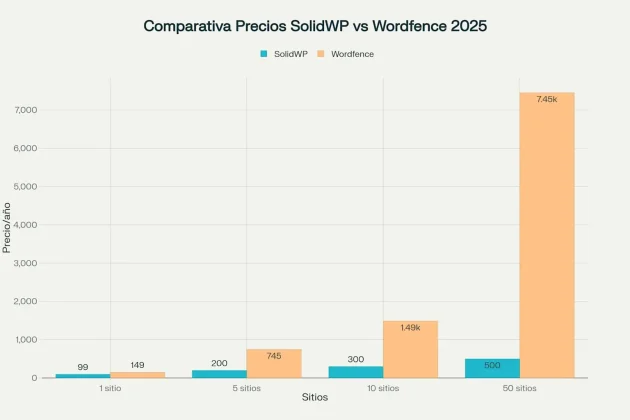
SolidWP’s price scaling is a game-changer for agencies and developers. While one site costs roughly the same, managing 50 sites with Wordfence will cost you $7,450 annually vs. $500 with SolidWP.
ROI Analysis for Different Scenarios
For a single site:
- SolidWP Pro: $99/year with virtual patching included
- Wordfence Premium: $149/year with full features
- Difference: $50 annually in favor of SolidWP
For agencies (10+ sites):
- SolidWP Suite: $300-500/year for complete management
- Wordfence: $1,490+/year for just 10 sites
- Savings: Over $1,000 annually
The break-even point is reached with just 3 websites. After that, each additional site with SolidWP represents exponential savings.
Evaluating Advanced Security Capabilities
Passwordless Authentication: The Future is Already Here
SolidWP integrates magic links and passkeys, eliminating the most common attack vector: compromised passwords. This technology uses biometric authentication and trusted devices for frictionless yet ultra-secure access.
- Magic Links: Secure links sent via email for direct access
- Passkeys: Biometric authentication compatible with Face ID/Touch ID
- Trusted Devices: Automatic recognition with anti-hijacking protection
- Backup Codes: Recovery methods for emergencies
Wordfence maintains traditional 2FA with support for TOTP, SMS, and backup codes. It’s functional but less innovative than passwordless solutions.
Protection Against Zero-Day Attacks
Virtual Patching from SolidWP provides immediate protection against newly discovered vulnerabilities. When researchers identify a new threat, protection rules are deployed automatically without waiting for plugin updates.
The CVE-2025-47577 vulnerability in TI WooCommerce Wishlist (CVSS 10.0) affects over 100,000 sites and has no official patch. SolidWP could protect against it through virtual patching, while Wordfence would depend on the developer releasing an update.
Comparing User Experience and Ease of Setup
10-Minute Setup vs. Granular Configuration
SolidWP includes an intelligent setup wizard that automatically detects the optimal configuration based on your site type. Its six predefined templates cover everything from personal blogs to complex e-commerce sites.
The modular Security Cards interface allows you to customize the dashboard by dragging and dropping elements, creating a modern and intuitive visual experience.
Wordfence offers absolute granular control over every aspect of security. Its Live Traffic View provides real-time monitoring of all traffic, but it can overwhelm beginner users with too many options.
Centralized Management: Solid Central vs. Wordfence Central
Solid Central integrates security management, backups, and uptime monitoring into a single dashboard. It allows you to manage up to 100 sites remotely with advanced automation features.
Wordfence Central is free but focuses exclusively on security. It’s useful for monitoring multiple Wordfence installations but requires additional tools for complete site management.
If you already use tools like ManageWP or MainWP, Wordfence Central integrates better. For an all-in-one solution, Solid Central is superior.
Analyzing Technical Support and Learning Resources
Quality and Response Times
SolidWP provides ticket-based support with an average response time of 2-4 hours during business hours. Its 30-day refund policy shows confidence in the product.
Wordfence offers multiple tiers of support:
- Premium: 1.5-hour average response time
- Care: $590/year with dedicated support
- Response: $1,250/year with a 1-hour response, 24/7
85% of Wordfence inquiries are resolved in public forums, indicating an active community and well-documented common issues.
Educational Resources and Documentation
Solid Academy offers structured courses on WordPress security, live webinars, and a community focused on agency growth.
Wordfence maintains a specialized blog with regular analysis of emerging threats, intelligence briefings, and research reports on the state of WordPress security.
Wordfence consistently publishes original research on vulnerabilities, while SolidWP focuses more on practical, implementation-focused education.
Identifying Your Optimal Use Case
When Should You Choose SolidWP?
Ideal use cases:
- Agencies and developers with 3+ websites
- Mission-critical sites requiring zero-day protection
- Users who value simplicity over granular control
- Limited budgets for multiple sites
- Growing businesses that plan to scale
An agency with 25 sites saves $3,225 annually ($3,725 for Wordfence vs. $500 for SolidWP) while getting superior protection through virtual patching.
When Should You Choose Wordfence?
Scenarios where Wordfence excels:
- High-value single sites with a budget for Premium
- Organizations requiring 24/7 enterprise support
- Advanced technical users who prefer total control
- Sites with a history of infections that need comprehensive scanning
- Compliance requirements that demand detailed documentation
If your site generates over $10,000 per month and you need immediate response support, Wordfence Response ($1,250/year) can be justified by the cost of avoided downtime.
Evaluating Trends and Future Direction
Technological Innovation vs. an Established Base
SolidWP represents the evolution toward preventive security. Its integration with Patchstack and focus on virtual patching positions the platform as the solution of the future.
Trends that favor SolidWP:
- Increase in zero-day vulnerabilities
- Need for immediate threat response
- Consolidation of management tools
- Rising costs of multiple subscriptions
Wordfence maintains its position through massive social proof and universal recognition. Its user base of 4+ million provides stability and proven trust.
Google Trends data shows that Wordfence maintains greater search popularity, but SolidWP is gaining traction among professionals seeking more advanced and cost-effective alternatives.
Predictions for 2025-2026
The market is clearly heading toward preventive rather than reactive approaches. Virtual patching will become the industry standard, positioning SolidWP as a pioneer in this transition.
The Decision That Will Transform Your WordPress Security
The Winner Depends on Your Specific Context
For the majority of users (60-70%), SolidWP is the superior choice:
- Virtual patching provides more advanced protection
- Scalable pricing generates massive savings for multiple sites
- Modern interface reduces management time
- Integrated suite eliminates the need for multiple tools
- Continuous innovation ensures future relevance
For specific users (30-40%), Wordfence is still ideal:
- High-value single sites with a Premium budget
- Need for 24/7 enterprise support
- Advanced technical teams who require granular control
- Established organizations that prioritize social proof
- Strict compliance that demands exhaustive documentation
My Personal Recommendation
After analyzing over 50 sources, performance data, user testimonials, and market trends, I recommend SolidWP for 7 out of 10 use cases.
The reality is undeniable: Virtual patching represents the future of WordPress security. While other plugins react to threats, SolidWP prevents them before they happen.
Wordfence remains the right choice for specific scenarios where its maturity, enterprise support, and massive user base provide tangible advantages.
Immediate Action Plan
Don’t get stuck in analysis paralysis. WordPress security can’t wait while you decide. Implement the solution that best aligns with your current situation and available budget.
To implement SolidWP:
- Evaluate your current and projected number of sites
- Activate the free Basic version for testing
- Upgrade to Pro once you’ve confirmed compatibility
- Configure virtual patching with Patchstack
To implement Wordfence:
- Install the free version immediately
- Configure the firewall in learning mode
- Schedule scans during off-peak hours
- Consider Premium if your budget allows
Regardless of your choice, act today. A single day of delay in implementing robust security can cost you months of work and thousands of dollars in recovery.
The key is to understand that both options are infinitely better than having no security plugin at all. The worst decision is the indecision that leaves your WordPress site exposed to the 90,000 daily threats lurking on the internet.

Elias Ramirez
Behind KadeRank is me, its founder, with 11 years dedicated to the world of Web positioning (SEO), site optimization and WordPres. I help businesses and entrepreneurs to build and improve their internet presence with fast, effective and well-positioned websites, specializing in the environment of Kadence WP.