
Setting Up Azanzada with RankMath: The Ultimate Step by Step Guide 2025
Elias Ramirez Sanchez
Actualizado June 27, 2025
Why Has Rank Math Become the Most Powerful SEO Plugin on the Market?
Rank Math has revolutionized the WordPress SEO landscape, emerging as the most comprehensive and advanced plugin available in 2025. With over 3 million active installations and an exceptional 4.9-star rating, this plugin has redefined expectations of what a free SEO tool can offer.
One of the reasons behind its success is the intuitive and powerful Rank Math setup, which allows both beginners and experts to optimize their sites from day one. Thanks to its step-by-step setup wizard, customizing every aspect of technical, on-page, and local SEO is simple and efficient. The Rank Math setup is designed to cover all ranking needs, integrating advanced features without complicating the process for the end user.
The key lies in its revolutionary philosophy: to democratize professional SEO. While other plugins keep their most valuable features behind a paywall, Rank Math offers premium functionalities completely free of charge. This includes optimization for unlimited keywords, real-time SEO analysis based on over 30 factors, and integrated Schema markup with support for more than 16 types of structured data.
The Technical Advantage That Sets It Apart
Rank Math technically outperforms its competitors in fundamental areas that directly impact your website’s performance:
Superior Performance:
- Plugin Size: Only 11.8 MB compared to Yoast SEO’s 32.4 MB.
- Memory Usage: +0.35 MB vs the competition’s +1.62 MB.
- Impact on Speed: +0.01 seconds vs +0.18 seconds.
- Optimized Code: 61,100 lines vs 97,100 in other plugins.
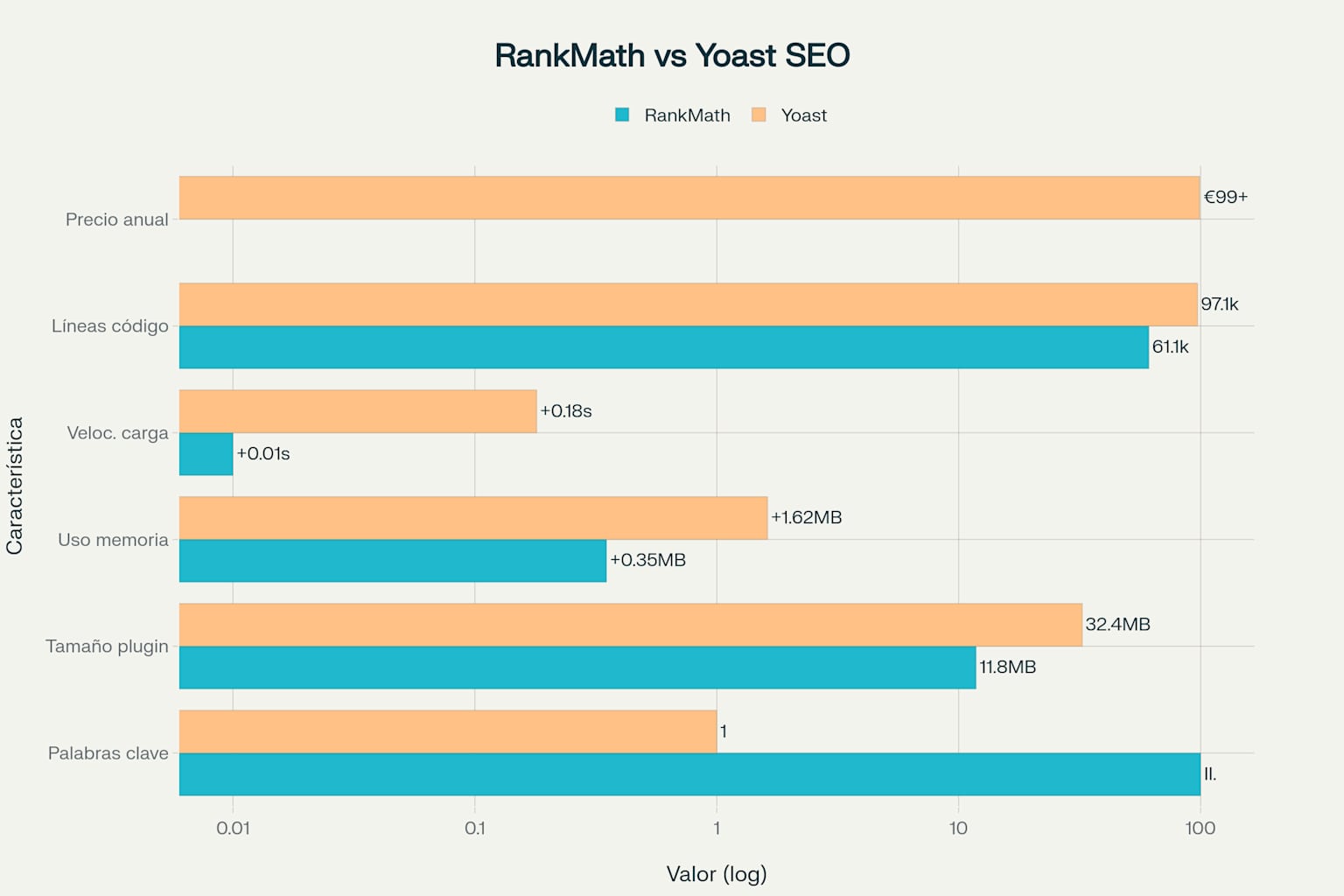
Technical comparison: Rank Math vs Yoast SEO – Performance and key features
This technical efficiency is no accident: Rank Math was built from the ground up with performance in mind, using modern code and an optimized architecture that minimizes its impact on loading speed.
Game-Changing Features
Advanced Real-Time SEO Analysis:
Rank Math provides instant feedback as you create content, evaluating over 30 critical SEO factors. Its visual scoring system uses intuitive colors: green for excellent optimization (80-100), yellow for good optimization (60-79), and red for poor optimization (0-59).
Revolutionary Keyword System:
While Yoast SEO limits you to 1 keyword in its free version, Rank Math allows up to 5 keywords by default, expandable to unlimited with a simple tweak. This capability is essential for modern SEO strategies that focus on related keyword clusters.
Native Integration with Google Tools:
The deep integration with Google Search Console and Google Analytics allows you to access critical data directly from your WordPress dashboard. This includes monitoring indexing errors, analyzing search queries, and real-time performance metrics.
Installation and Initial Setup: The Foundation of Your SEO Success
Step 1: Professional Plugin Installation
Correctly installing Rank Math is the first critical step toward SEO mastery. This process, though simple, requires attention to specific details that will ensure optimal performance.
Optimized Installation Process:
- Log in to your WordPress dashboard with administrator credentials.
- Navigate to Plugins → Add New from the side menu.
- Search for “Rank Math” in the search box.
- Identify the official plugin: “Rank Math SEO – AI SEO Tools to Dominate SEO Rankings.”
- Click “Install Now” and then “Activate.”
Pro Tip: Verify that it’s the official plugin developed by Rank Math, identifiable by its over 3 million active installations and 5-star rating.
Step 2: Configuring the Intelligent Setup Wizard
Once activated, Rank Math will automatically direct you to its revolutionary Setup Wizard. This intelligent assistant practically configures the plugin without manual intervention, but it’s crucial to make the right decisions at each step.
Selecting the Setup Mode:
The first critical decision is choosing between Easy Mode and Advanced Mode. To gain full control over your SEO, always select Advanced Mode. This choice will give you:
- Granular control over every available setting.
- Access to advanced technical options not available in Easy Mode.
- Detailed configuration of Schema markup and structured data.
- Complete customization based on your site’s specific needs.
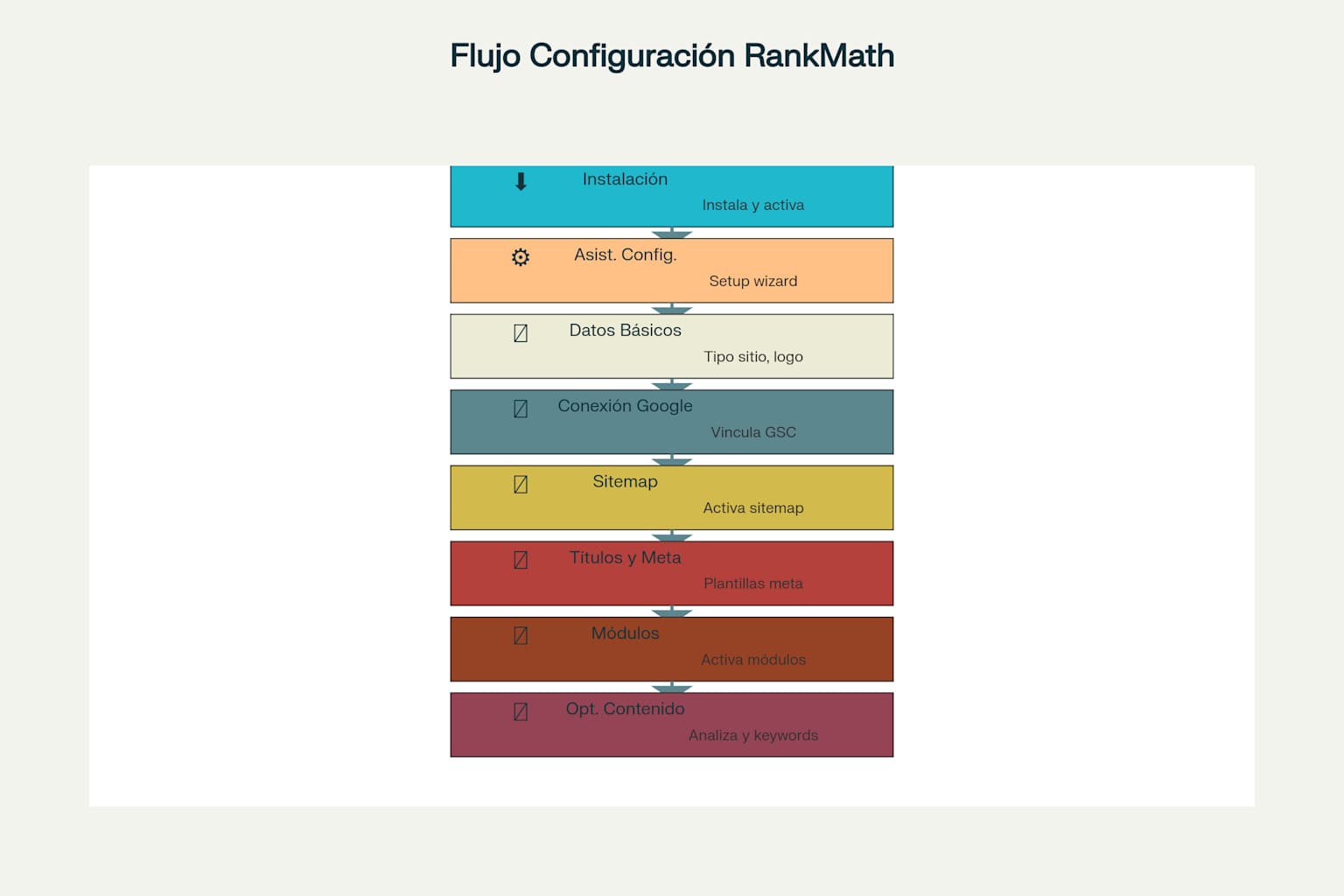
Complete Rank Math setup process: 8 essential steps for SEO optimization
Step 3: Configuring Fundamental Site Data
This stage establishes the technical foundation of your SEO optimization. The information you provide here will be used to generate structured data and optimize how search engines understand your content.
Essential Settings:
Website Type: Select the category that best describes your project:
- Personal Blog: For individual editorial content.
- Business/Company: For corporate websites.
- Local Business: For companies with a specific physical location.
- E-commerce: For online stores (this will activate specific optimizations).
- News Site: For media outlets.
Critical Business Information:
- High-quality logo: PNG format, minimum dimensions 512×512 pixels.
- Default social media image: 1200×630 pixels for optimized sharing.
- Complete contact details: Address, phone, email (crucial for local SEO).
Step 4: Strategic Integration with Google
Connecting to Google Search Console is fundamental for long-term SEO success. This integration allows Rank Math to access direct data from Google to provide accurate performance insights.
Optimized Connection Process:
- Click “Connect with Google Search Console.”
- Authorize the specific permissions that Rank Math needs.
- Select the correct property if you have multiple sites.
- Verify a successful connection using test data.
Immediate Benefits of Integration:
- Automatic monitoring of indexing errors.
- Detailed analysis of search queries and performance.
- Proactive detection of technical SEO issues.
- Automatic submission of updated sitemaps.
Advanced Sitemap Configuration: The Roadmap for Google
Strategic Optimization of Sitemap Content
XML sitemaps are the navigation map you provide to search engines to discover and crawl your content efficiently. Rank Math generates smart sitemaps that update automatically, but strategic configuration determines their effectiveness.
Elements That MUST Be Included:
- Main pages with significant SEO value.
- High-quality, relevant blog posts.
- Optimized product/service pages.
- Important resource pages (guides, tutorials).
Elements That Should NEVER Be Included:
- Administrative and login pages.
- Post-form thank you pages.
- Duplicate or low-quality content.
- Temporary or test pages.
Advanced Technical Settings:
To access sitemap settings, navigate to Rank Math SEO → Sitemap Settings. Here you will set critical parameters:
URLs per Sitemap: 1000 (optimal for performance)
GZIP Compression: Enabled (significantly reduces size)
Include Images: Enabled (improves visual SEO)
Modification Date: Enabled (optimizes crawling)
Intelligent Configuration by Content Type
For Blog Posts:
- Include Posts: Enabled for all published content.
- Frequency: Weekly/Daily for active blogs.
- Priority: 0.6-0.8 for main content.
- Images: Include all images from the content.
For Static Pages:
- Frequency: Monthly/Yearly depending on how often they change.
- Priority: 0.8-1.0 for critical business pages.
- Specific Exclusions: Policy pages, legal terms.
Configuring robots.txt and .htaccess
Managing robots.txt and .htaccess from within Rank Math is one of the plugin’s most advanced features, allowing granular control over crawler behavior and server configuration.
robots.txt Configuration:
Rank Math creates a virtual robots.txt file that can be edited directly from the WordPress dashboard without needing FTP access. To access this feature, navigate to Rank Math SEO → General Settings → Edit Robots.txt.
Recommended basic structure:
User-agent: *
Allow: /wp-content/uploads/
Disallow: /wp-admin/
Disallow: /wp-includes/
Disallow: /wp-content/plugins/
Disallow: /wp-content/themes/
Disallow: /trackback/
Disallow: */feed/
Disallow: */comments/
Disallow: /*?s=
Disallow: /*?p=*&
Disallow: /*?attachment_id=*

Sitemap: https://yourdomain.com/sitemap.xml
Specific settings by site type:
For e-commerce (WooCommerce):
User-agent: *
Disallow: /cart/
Disallow: /checkout/
Disallow: /my-account/
Disallow: /*add-to-cart=*
Disallow: /*?orderby=*
Disallow: /*?min_price=*
Allow: /shop/
Allow: /products/
For membership/private area sites:
User-agent: *
Disallow: /members/
Disallow: /login/
Disallow: /register/
Disallow: /*?action=*
.htaccess Configuration:
Domain redirections (www vs non-www):
# Redirect from non-www to www
RewriteCond %{HTTP_HOST} ^example.com [NC]
RewriteRule ^(.*)$ https://www.example.com/$1 [L,R=301]
Force HTTPS:
# Force HTTPS
RewriteCond %{HTTPS} off
RewriteRule ^(.*)$ https://%{HTTP_HOST}%{REQUEST_URI} [L,R=301]
GZIP Compression:
# Enable compressionAddOutputFilterByType DEFLATE text/plain AddOutputFilterByType DEFLATE text/html AddOutputFilterByType DEFLATE text/xml AddOutputFilterByType DEFLATE text/css AddOutputFilterByType DEFLATE application/xml AddOutputFilterByType DEFLATE application/xhtml+xml AddOutputFilterByType DEFLATE application/rss+xml AddOutputFilterByType DEFLATE application/javascript AddOutputFilterByType DEFLATE application/x-javascript
Mastering Titles and Meta Descriptions: Your Secret Weapon for CTR
Dynamic Templates That Maximize Results
Configuring title templates is where most websites miss massive traffic opportunities. Rank Math allows you to create consistent formats that automatically adapt to each piece of content.
High-Performance Templates:
For Content Blogs:
%title% | %sitename% - %currentyear%
This structure includes the current year, which is crucial for content that requires freshness.
For Business Pages:
%title% - %sitename% | [Your Unique Value Proposition]
For E-commerce:
%title% | Shop at %sitename% - Free Shipping
Powerful Dynamic Variables:
%title%– Specific content title%sitename%– Your brand/site name%category%– Main category%currentyear%– Current year (crucial for evergreen content)%author%– Content author%focuskw%– The configured primary keyword
Meta Descriptions That Convert Visitors
Meta descriptions are your direct sales pitch in the search results. An optimized description can increase CTR by 20-40%.
High-Performance Meta Description Formula:
Winning Structure:
[Main Benefit] + [Keyword] + [Call to Action] + [Differentiator]
Optimized Example:
Discover the 7 SEO strategies that boosted traffic by 300%. A complete guide with real case studies. Download for free today!
Critical Technical Specifications:
- Optimal length: 145-160 characters
- Include keywords naturally
- Clear call to action (“Discover,” “Learn,” “Get”)
- Specific user benefit
Essential Modules: Activating the Full Power of Rank Math
SEO Analyzer: Your 24/7 Personal Consultant
The integrated SEO analyzer evaluates your website based on over 30 critical industry-recognized factors. This tool provides comprehensive audits that identify technical issues and immediate improvement opportunities.
Automatically Evaluated Factors:
Fundamental Technical Aspects:
- Optimized loading speed
- Full mobile compatibility
- HTTPS configuration and security
- URL structure and permalinks
- Redirection implementation
Content Optimization:
- Strategic keyword density
- Image optimization with alt attributes
- H1-H6 heading distribution
- Internal and external links – quality and relevance
- Schema markup – correct implementation
404 Monitor and Intelligent Redirection System
The 404 Monitor automatically detects broken pages and provides redirection solutions before they affect your SEO. This functionality is critical for maintaining domain authority and user experience.
Strategic Configuration:
- Activate full monitoring of 404 errors.
- Set a log limit (200-500 recommended).
- Configure exclusions for bots and automated crawlers.
- Implement automatic redirections for similar URLs.
Rich Snippets and Schema Markup: Standing Out in the SERPs
Rich Snippets dramatically improve the appearance of your content in search results, potentially increasing CTR by 20-40%. Rank Math includes native support for over 16 types of Schema markup.
Most Impactful Schemas:
- Article: For editorial content and blog posts.
- Product: For product pages (e-commerce).
- FAQ: For frequently asked questions sections.
- HowTo: For tutorials and step-by-step guides.
- LocalBusiness: For businesses with a physical location.
- Review: For reviews and ratings.
Real-Time Content Optimization: Writing to Dominate
SEO Analysis As You Write
Rank Math’s most revolutionary feature is its real-time SEO analysis, which provides instant feedback during content creation. This functionality transforms every writing session into an optimization masterclass.
Visual Scoring System:
- Green (80-100): Excellent optimization – ready to publish.
- Yellow (60-79): Good optimization – minor improvements recommended.
- Red (0-59): Poor optimization – requires additional work.
Instantly Evaluated Elements:
- Keyword presence in the title, subheadings, and content.
- Optimal keyword density (0.5-2.5% recommended).
- Content length (minimum 600 words for competitiveness).
- Heading distribution and logical structure.
- Internal links – quantity and contextual relevance.
Configuring Strategic Keywords
Rank Math allows you to optimize for unlimited keywords, surpassing the limitations of other plugins. This capability is fundamental for modern SEO strategies based on topic clusters.
Winning Keyword Strategy:
For Informational Content:
- Primary Keyword: High-volume term (medium competition).
- Long-tail Keywords: 3-5 specific variations.
- LSI Keywords: Semantically related terms.
- Related Questions: Based on “People Also Ask.”
For Commercial Content:
- Commercial Keywords: With purchase intent (“best,” “buy,” “price”).
- Local Keywords: Including geographic location.
- Branded Keywords: Protecting brand territory.
Advanced Technical Setup:
- Define the primary keyword in the Focus Keyword field.
- Add up to 4 related secondary keywords.
- Set up position tracking (Rank Math Pro).
- Establish priorities based on search volume and competition.
Monitoring and Maintenance: Ensuring Continued Success
Comprehensive Control Dashboard
The Rank Math dashboard centralizes all critical SEO metrics into a unified interface. This control center allows you to monitor fundamental aspects without leaving WordPress.
Key Monitored Metrics:
- Dynamically updated overall SEO score.
- Technical errors requiring immediate attention.
- Keyword performance and Google rankings.
- Organic traffic and engagement metrics.
- Indexing issues reported by Search Console.
Performance Analysis with Real Data
The integration with Google Search Console and Google Analytics provides insights based on real performance data.
Critical Performance Metrics:
- Average CTR by page and keyword.
- Total impressions and growth trends.
- Average position in search results.
- Search queries that generate traffic.
- Top-performing organic pages.
Proactive System Maintenance
Essential Maintenance Tasks:
Weekly Review:
- Check for new 404 errors and resolve them.
- Monitor drops in critical keyword rankings.
- Review indexing issues in Search Console.
- Analyze pages with declining organic traffic.
Monthly Maintenance:
- Database cleanup – delete old logs.
- Update sitemaps after structural changes.
- Content audit – identify improvement opportunities.
- Review settings after plugin updates.
Quarterly Optimization:
- Competitive analysis using integrated tools.
- Evaluation of keyword strategy.
- Full technical audit of the website.
- Content planning based on performance data.
Systematically implementing this guide will lay a solid foundation for mastering SEO with Rank Math. Every setting, from initial installation to ongoing monitoring, is designed to maximize your search engine visibility and drive sustainable organic traffic growth.

Elias Ramirez
Behind KadeRank is me, its founder, with 11 years dedicated to the world of Web positioning (SEO), site optimization and WordPres. I help businesses and entrepreneurs to build and improve their internet presence with fast, effective and well-positioned websites, specializing in the environment of Kadence WP.